โ† Back to all projects
๐Ÿ“ฑ Mobile App ยท iOS & Android

School
Mobile App

A student companion app that brings the school experience to your pocket โ€” schedules, attendance, announcements, and a much easier way to re-enroll for returning students.

My role
UX/UI Designer
Platform
iOS & Android
Company
Wela School Systems
Status
Shipped โœ“
0
Trips to school needed for existing students to re-enroll
5
Form sections, mostly pre-filled โ€” only 2 need updating
4
User types served by one unified app
โœ“
Shipped to real schools & actively used
Students had to go to school just to re-enroll. ๐Ÿ˜ฉ

The CEO collected feedback from real users. One complaint stood out above the rest โ€” returning students were frustrated that after using the app for everything else, they still had to physically show up at school every year just to re-enroll.

๐Ÿซ
Physical re-enrollment only
Existing students had to go to school every year to re-enroll โ€” even though all their information was already in the system. It felt pointless and time-consuming.
โฑ๏ธ
Long queues, repeated paperwork
The process involved waiting in line, filling out forms with information they'd already submitted before, and getting processed manually by school staff.
๐Ÿ“ฑ
The app existed โ€” but didn't help
Students used the app for schedules, grades, and attendance. But enrollment wasn't in there. It felt like a missing piece they expected to find but couldn't.
๐Ÿ‘จโ€๐Ÿ‘ฉโ€๐Ÿ‘ง
Four types of users, one app
Students, parents, teachers, and admins all use the same app with different needs. The design needed to work for all of them without feeling confusing for any of them.
What were we trying to solve? ๐ŸŽฏ

๐Ÿ’ฌ "How might we simplify re-enrollment for returning students โ€” so they can complete the entire process from their phone, without ever having to visit school just for paperwork?"

Four very different people, one app. ๐Ÿ‘ฅ

Think of it like a school building โ€” everyone walks through the same front door, but they all go to different places inside.

๐Ÿ‘ฉโ€๐ŸŽ“
Students
Check schedules, view grades, time in/out, read announcements, and re-enroll for the next school year โ€” all from their phone.
๐Ÿ‘ช
Parents
Monitor their child's attendance and grades, stay updated on school announcements โ€” without needing to call the school.
๐Ÿ‘ฉโ€๐Ÿซ
Teachers
Manage class activities, post announcements, and track student progress all in one place.
๐Ÿข
Admin
Oversee enrollment, approve applications, manage student records, and keep the whole system running smoothly.
A sprint-inspired approach. ๐Ÿƒ

No formal usability sessions โ€” real user complaints came via our CEO, and I backed every decision up with structured UX methods and my own research.

1
Discover
CEO-relayed feedback from real student complaints
2
Define
Mapped the re-enrollment pain points
3
Research
Studied mobile enrollment flows at other apps
4
Design
Mobile-first accordion form in Figma
5
Iterate
Refined based on feasibility & stakeholder review
6
Ship
Handed off to dev, deployed to schools
Keep it simple. Keep it fast. โšก

The biggest challenge: design an enrollment form that feels like filling out a quick form โ€” not like filing tax paperwork.

๐Ÿ“‚
Accordion sections, not endless scrolling
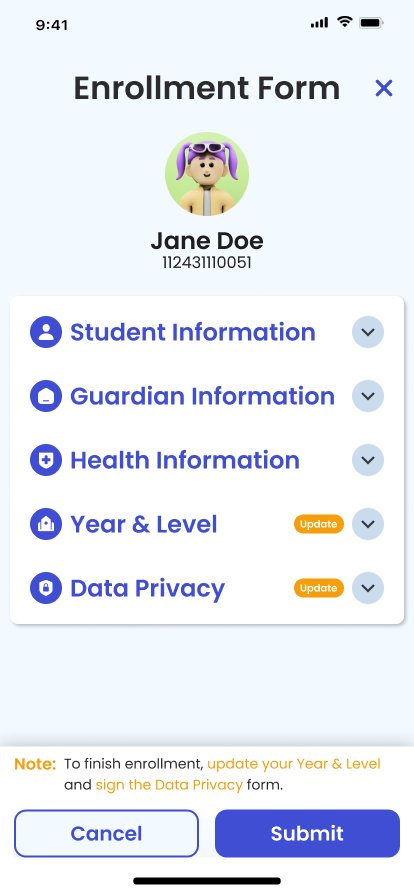
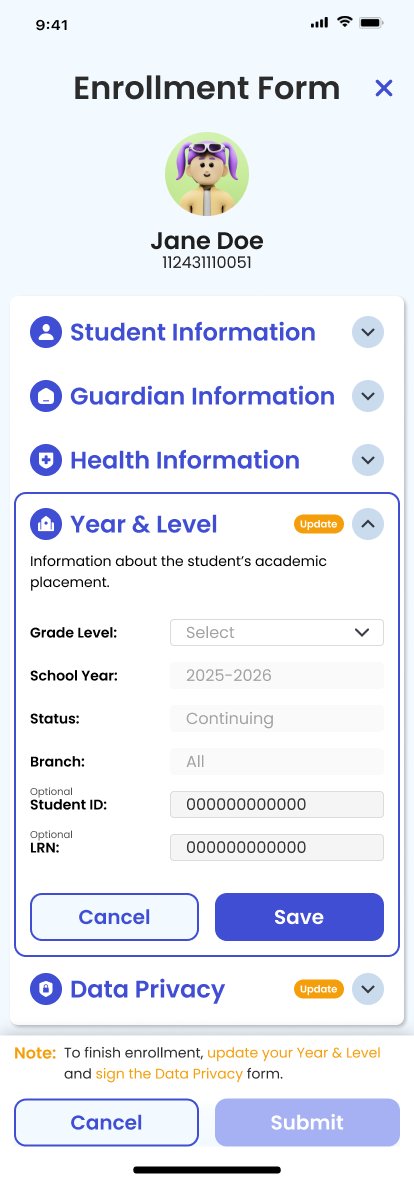
The enrollment form is split into collapsible sections (Student Info, Guardian Info, Health Info, Year & Level, Data Privacy). Users only open what they need to update โ€” not everything at once.
๐Ÿ”–
"Update" badges highlight what matters
Orange "Update" badges appear only on the sections that need attention โ€” Year & Level and Data Privacy. Everything else is pre-filled from the previous year. No re-typing what's already there.
๐Ÿšฆ
Clear status on the home screen
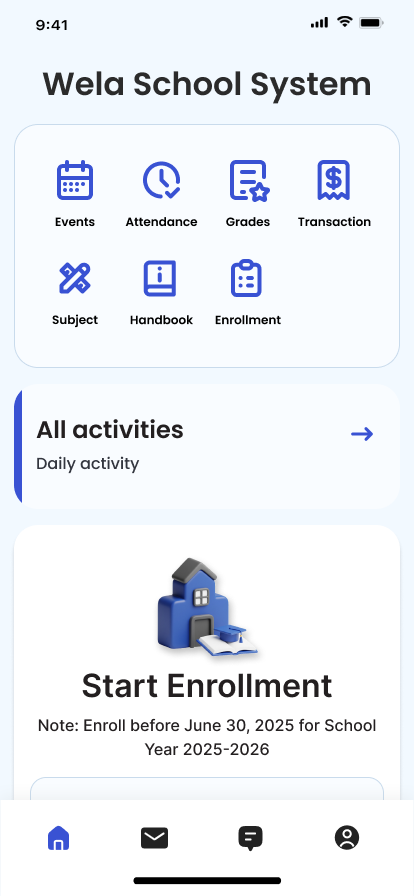
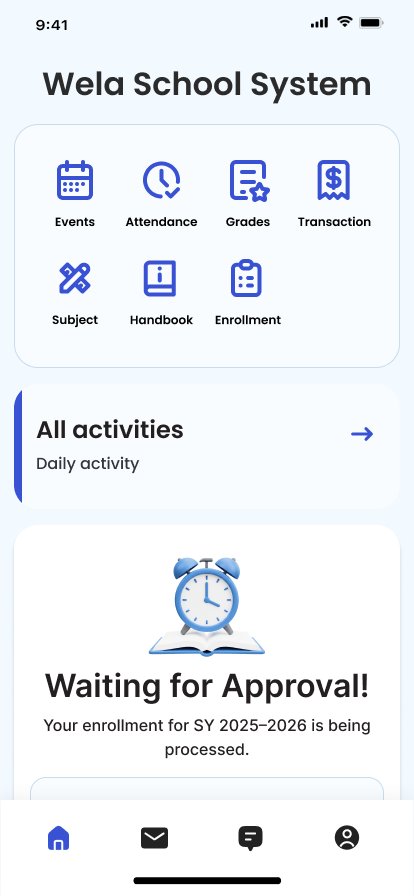
Students see exactly where they stand: "Start Enrollment" when it's open season, "Waiting for Approval" once they've submitted. No uncertainty about whether it went through.
โœ…
Honest constraints, clearly communicated
New students still need to enroll in person โ€” and we didn't hide that. The app makes it clear who the re-enrollment flow is for, so returning students feel helped rather than confused.

โš ๏ธ One constraint we had to work with: New students still needed to enroll at school in person โ€” the system requires it for first-time verification. We designed around this honestly. The flow is clearly for returning students only, and it's communicated upfront so no one is left confused.

Here's what it looks like. ๐Ÿ‘€

Clean, friendly, and built for students who just want to get things done quickly from their phone.

Home screen โ€” two enrollment states

Enrollment form โ€” collapsed & expanded

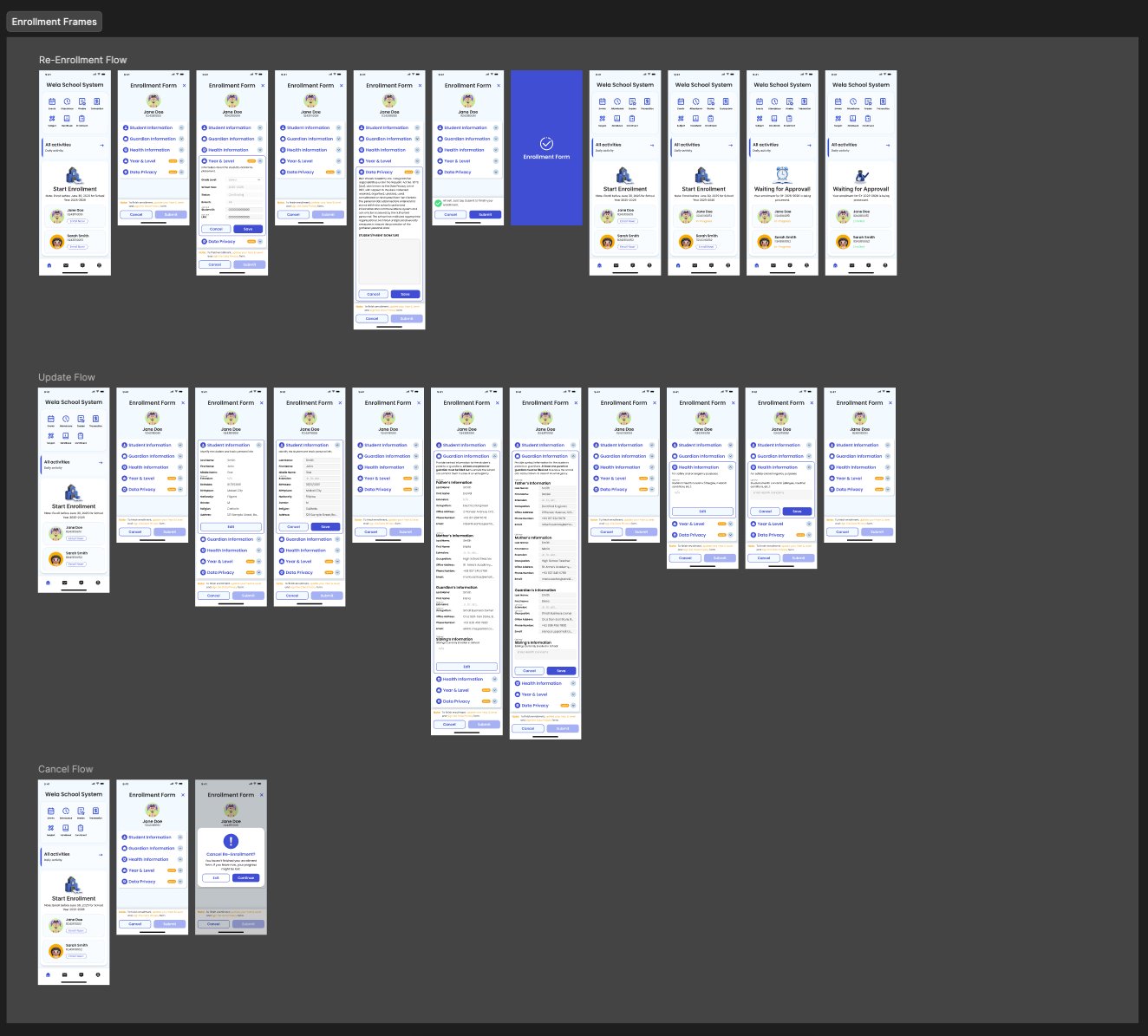
Full re-enrollment flow โ€” all screen states in Figma

Full flow overview
Re-enrollment ยท Update ยท Cancel flows โ€” complete prototype in Figma
How did we know it actually worked? ๐Ÿงช
๐Ÿ’ฌ
Proxy Feedback Analysis
Our CEO relayed real complaints from students and support staff โ€” this gave us a clear picture of what wasn't working. Each piece of feedback was mapped to a specific design problem and addressed directly in the redesign.
๐Ÿ“‹
Heuristic Evaluation
I evaluated the enrollment flow against usability heuristics โ€” particularly around simplicity, clarity, error prevention, and form efficiency. The accordion structure and pre-filled fields came directly from this evaluation.
๐Ÿซ
Stakeholder Review Session
The design was reviewed with the internal product and support teams before handoff. Stakeholders confirmed that the simplified form structure directly addressed what returning students had been asking for.
What changed for students. ๐ŸŽ‰
0
Trips to school needed for returning students to re-enroll
5
Form sections โ€” mostly pre-filled, only 2 need updating
4
User types served by one unified, simple interface

๐Ÿ“ฑ The real win: Returning students can now re-enroll in a few taps from their phone โ€” any time, anywhere. No queues, no reprinting forms, no wasted afternoon. The app finally does what students expected it to do all along.

Where do we go from here? ๐Ÿš€

๐Ÿ“Œ Recommended: Task-Based Usability Testing. Now that the feature is live, the next step is running task-based tests with real returning students โ€” measuring time-on-task and completion rate for the re-enrollment flow. This will confirm exactly how much effort we saved them, and highlight any remaining friction points we can fix in the next iteration.

Lessons I'm taking to every project. ๐Ÿ“š
๐Ÿง 
Real constraints make you more creative
Not being able to enroll new students digitally felt like a limitation. But leaning into it โ€” and being transparent about it in the UI โ€” actually made the experience feel more trustworthy and honest.
๐Ÿ“‹
Pre-filled forms are a superpower
Asking users to re-type information they've already submitted before is frustrating. Using what's already in the system โ€” and only asking for what's changed โ€” is what makes enrollment feel "smart."
๐Ÿ’ฌ
Secondhand feedback is still gold
Even feedback relayed through our CEO gave clear design direction. Real complaints from real students are worth more than any assumption I could make sitting at my desk.
See more work.